
1. 登录请求分析
当我们拿到一个网站时,首先就是抓包定位加密参数的实现,F12打开网站控制台后分析登录请求
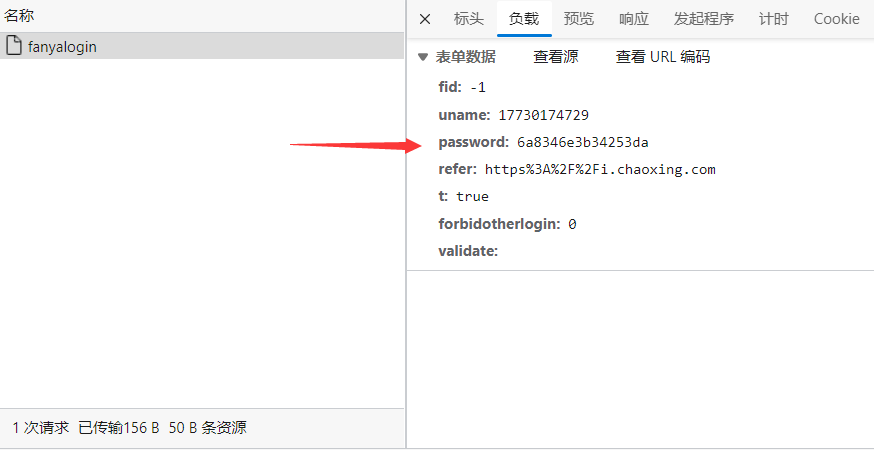
我们可以看出他这里对password进行了加密,我们可以直接点分析发起请求的堆栈,这里的loginByPhoneAndPwdSubmit方法就比较可疑

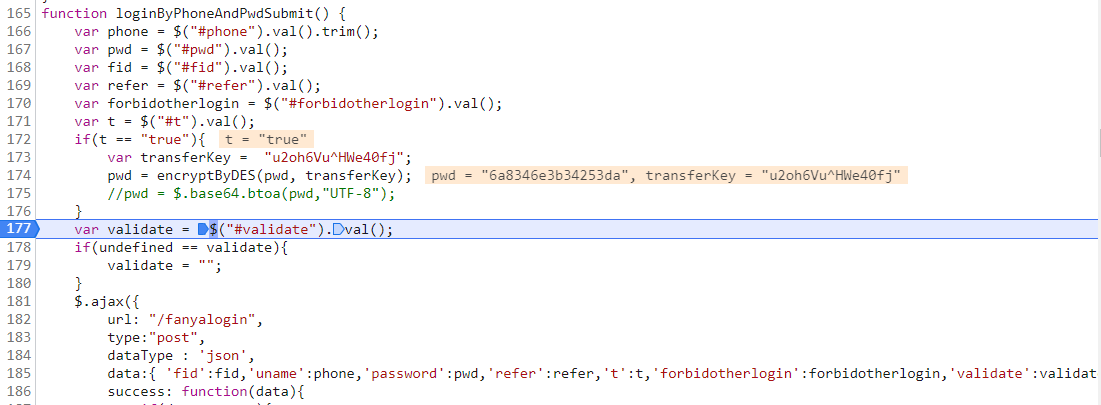
我们点进来发现该方法中pwd是调用方法encryptByDES()而来;我们直接在这里下断点, 调用确定一下,发现他就是我们要找的位置
2. 搜索关键函数
我们直接搜索这个函数名直接找到该函数
function encryptByDES(message, key){
	var keyHex = CryptoJS.enc.Utf8.parse(key);
	var encrypted = CryptoJS.DES.encrypt(message, keyHex, {
		mode: CryptoJS.mode.ECB,
		padding: CryptoJS.pad.Pkcs7
	});
	return encrypted.ciphertext.toString();
}
发现这里用了CryptoJS加密,使用DES的ECB pk7模式
这里返回的结果是16进制
return encrypted.ciphertext.toString()
如果base64格式的,直接使用
return encrypted.toString()
这个message是我们传的参数,key就是加密使用的密码了 我们知道DES加密Key为8个字节共64位 这里的秘钥u2oh6Vu^HWe40fj我们取前8位就行了
3.实现加密
这里我们用python实现加密
import binascii
from Crypto.Cipher import DES
from Crypto.Util.Padding import pad


def enc(data):
    data = data.encode("utf8")
    key = 'u2oh6Vu^'
    cipher = DES.new(key.encode("utf8"), DES.MODE_ECB)
    res = cipher.encrypt(pad(data, 8))
    return binascii.hexlify(res).decode()


print(enc("123456789"))
4.构造请求requests请求
import requests
import binascii
from Crypto.Cipher import DES
from Crypto.Util.Padding import pad


def enc(data):
    data = data.encode("utf8")
    key = 'u2oh6Vu^'
    cipher = DES.new(key.encode("utf8"), DES.MODE_ECB)
    res = cipher.encrypt(pad(data, 8))
    return binascii.hexlify(res).decode()


def login(uname,password):


    headers = {
        'Accept': 'application/json, text/javascript, */*; q=0.01',
        'Accept-Language': 'zh-CN,zh;q=0.9,en;q=0.8,en-GB;q=0.7,en-US;q=0.6',
        'Cache-Control': 'no-cache',
        'Connection': 'keep-alive',
        'Content-Type': 'application/x-www-form-urlencoded; charset=UTF-8',
        'Origin': 'https://passport2.chaoxing.com',
        'Pragma': 'no-cache',
        'Referer': 'https://passport2.chaoxing.com/login?fid=&newversion=true&refer=https^%^3A^%^2F^%^2Fi.chaoxing.com',
        'Sec-Fetch-Dest': 'empty',
        'Sec-Fetch-Mode': 'cors',
        'Sec-Fetch-Site': 'same-origin',
        'User-Agent': 'Mozilla/5.0 (Windows NT 10.0; Win64; x64) AppleWebKit/537.36 (KHTML, like Gecko) Chrome/101.0.4951.64 Safari/537.36 Edg/101.0.1210.53',
        'X-Requested-With': 'XMLHttpRequest',
        'sec-ch-ua': '^\\^',
        'sec-ch-ua-mobile': '?0',
        'sec-ch-ua-platform': '^\\^Windows^\\^',
    }

    data = {
        'fid': '-1',
        'uname': uname,
        'password': enc(password),
        'refer': 'https^%^253A^%^252F^%^252Fi.chaoxing.com',
        't': 'true',
        'forbidotherlogin': '0',
        'validate': ''
    }

    response = requests.post('https://passport2.chaoxing.com/fanyalogin', headers=headers, data=data)
    print(response.text)


login('uin','pwd')
然后我们就可以使用加密构造登录请求进行一系列骚操作了